Designing Trust Behind the Scenes
UX Research · Case Study
Operational Ethnography in Mortgage Operations
Role — Mortgage Processing Officer · Duration — 6 months · Method — Embedded Operational Ethnography
The system assumed every entry was perfect. Human work is not perfect. Nobody designed for that gap.
Here is what the job actually was
Every day I sat down and paid property tax bills. One at a time. One per client, one per municipality, entered manually into a legacy system.
Sounds simple. It was not.
Get one digit wrong , a transposition, a tired finger hitting the wrong key — and the payment goes out wrong. Too much or too little, straight to the tax office, no way to stop it. Once it is sent, it is sent. The municipality receives whatever number you typed. If you overpaid, it sits as a credit. If you underpaid, the client has a shortfall, and fixing it means a separate payment process, multiple people involved, hours of back-and-forth, anxiety for everyone in the chain.
There was no duplicate check. No anomaly alert. No "are you sure?" before submission.
Just you, the keyboard, and the hope that your attention held after the fortieth entry of the day.
The thing that kept me up at night
Prepayment and arrears processing was a different kind of pressure.
When I processed a prepayment ,crediting money from a client's bank account, everything had to balance. Every figure had to match. If something was off and I did not catch it before closing, it went straight to the accounting department.
What followed was hours of investigation, escalation up the chain, multiple people pulled in, and the exhausting process of trying to prove what had happened ,when the system kept no record of what I had done.
The only protection I had was a screenshot. Taken before closing. Every single time.
If I forgot even once and something surfaced later, it was gone. No history. No trail. No way to show what I had entered. Just me trying to reconstruct a transaction from memory while someone in accounting waited for an answer.
That is not a system with a flaw. That is a system that was never designed for the humans inside it.
What I was actually doing for six months
I was not just processing mortgage cases. I was the safety net the system never built.
Three disconnected legacy platforms. No integration between them. Every piece of information manually transferred from one to the next. Workflow logic that existed nowhere in writing only in the heads of people who had been there long enough to learn it by watching someone else.
When I joined, there was no guide. No documentation. I watched a colleague and wrote my own notes. If that person had been on leave, I would have had nothing.
When something went wrong, there was no help text. No plain-language explanation. Just a cryptic error code and the unspoken instruction: find someone who has seen this before.
The colleague was the support system. Until they leave. And then that knowledge is gone too.
The scale of what that looked like every day
~70 tax bills entered manually per day — one by one, one municipality at a time 3 disconnected systems requiring constant context switching 0 batch processing options available 0 system-level audit trail after closing
Lookup → Verify → Enter → Submit → Reconcile → Repeat
Seventy times. Every day. With no safeguard between a tired keystroke and an irreversible payment.
What this taught me about design
I came into this role as a Mortgage processer. I left it understanding something that no textbook captures cleanly.
Systems do not fail dramatically. They fail quietly through the thousand small compensations that employees build around them. The screenshot habit. The personal checklist. The informal "always double-check the amount before you close" that gets passed from one person to the next because the system never made it automatic.
From the outside, the operation looked smooth. From the inside, that smoothness was held together by individual vigilance and institutional memory that lived in people not in systems.
That is a fragile kind of reliability.
The research underneath it
Six months of embedded operational ethnography. Not observing the work doing it. Processing real cases under real pressure, and documenting what formal process documentation never captures: the workarounds, the anxiety points, the moments where the system hands the problem back to the person.
Methods: Longitudinal observation · Processing pattern analysis · Reflective field notes · Cognitive load mapping · Service blueprint thinking
What I was looking for: Not surface-level friction. The deeper question why does this system require extraordinary human effort to produce ordinary results?
Problem Statement
Mortgage property tax servicing is customer-facing in outcome but operationally invisible in execution.
Customers see: ✓ Tax paid ✓ Balance updated ✓ Account maintained
Behind that sits a manual, fragmented, memory-dependent process involving legacy green-screen interfaces, repetitive data entry, multi-system switching, no audit trail, and unclear error handling.
The system was built to process transactions. It was not built for the humans doing the processing.
How might legacy mortgage servicing systems reduce repetitive operational effort while improving workflow clarity, resilience, and transparency for both employees and customers?
Research Approach
Embedded Operational Ethnography
I did not study this system from a distance. I worked inside it.
Six months of embedded operational ethnography, longitudinal observation, processing pattern analysis, reflective field notes, system interaction mapping, and service blueprint thinking. This was research grounded in lived practice, capturing the tacit knowledge and normalised friction that formal documentation consistently misses.
Research lens: Embedded ethnography + cognitive load analysis + service blueprinting + operational systems mapping
Operational Burden Map
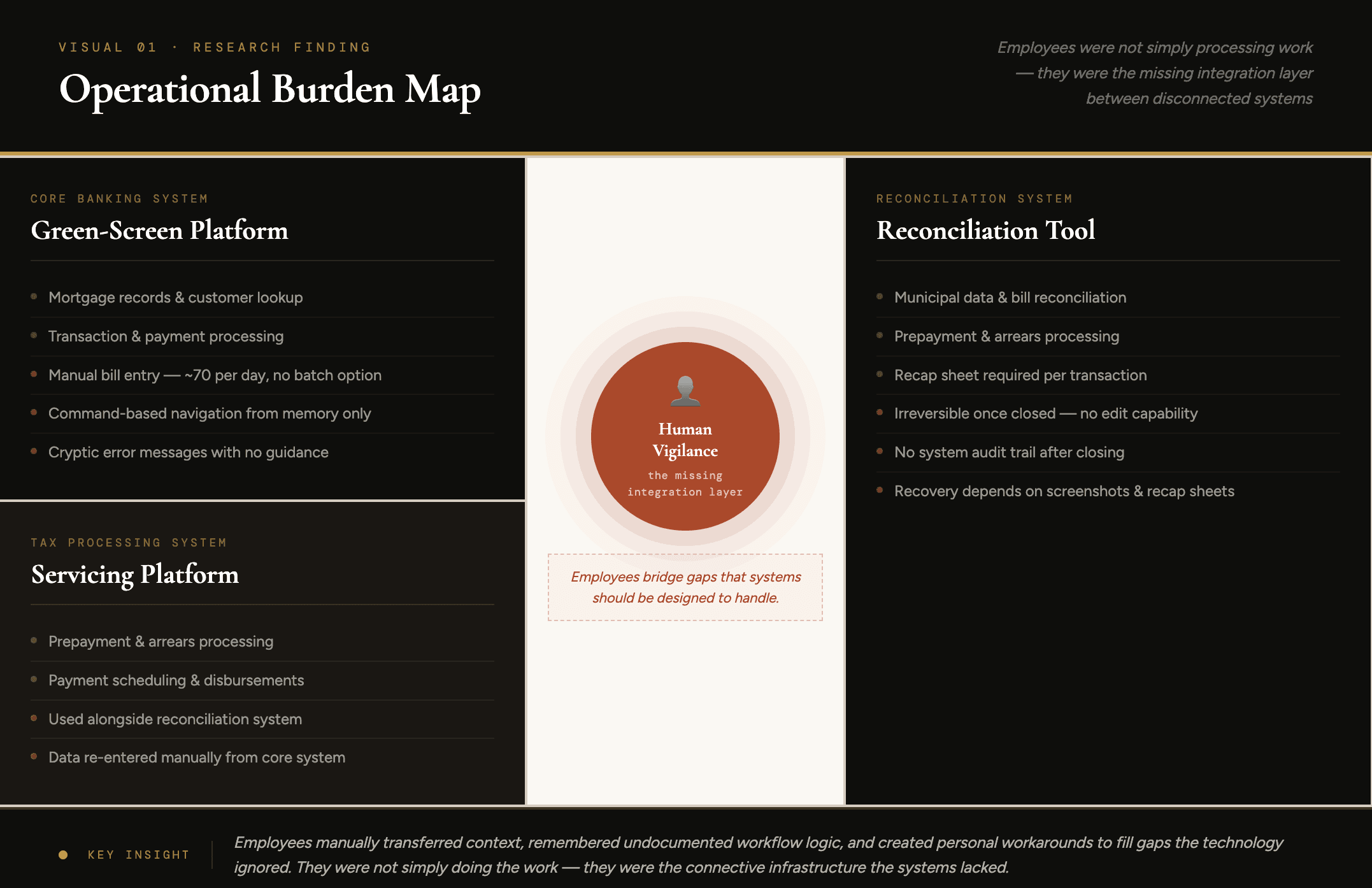
At the centre of three disconnected legacy core banking systems , including green-screen enterprise platforms, servicing systems, and reconciliation tools, was not integration. It was people.
Employees manually transferred context between systems, remembered workflow logic that was never documented, verified inconsistencies the systems could not catch, and built personal workarounds to fill gaps the technology ignored.
Employees were not simply processing work , they were the missing integration layer between disconnected systems.
Key Findings
01 — Knowledge lived in people, not systems No documentation. No onboarding guide. No in-system support. Everything learned by watching, everything held in memory. When people leave, the knowledge leaves.
Opportunity → In-system guidance, searchable workflow documentation, embedded onboarding
02 — The system designed fatigue into the work Seventy identical manual entries a day. No batch option. No shortcut. By mid-afternoon, the work became mechanical — and mechanical work under time pressure is exactly when errors happen. The system did not cause mistakes through complexity. It caused them through relentless repetition with no protection.
Opportunity → Batch processing, auto-population from verified records, anomaly detection
03 — One forgotten screenshot could escalate into hours of damage No audit trail after closing. Recovery depended entirely on whether you had remembered to screenshot before you closed. If you had not — and something surfaced — you were reconstructing a transaction from memory while accounting waited. Anxious. Exhausting. Entirely preventable.
Opportunity → System-maintained audit trail, pre-close confirmation screen, post-close view-only record
04 — Errors told you nothing useful When something went wrong, the system said so. It did not say what, why, or what to do. Troubleshooting meant finding someone more experienced. The colleague was the error recovery system. Until they leave.
Opportunity → Human-readable errors with guided next steps
05 — Customers had no idea any of this was happening They saw a confirmed payment. They did not see the manual entry, the verification, the reconciliation, the screenshot habit, the anxiety. When everything worked, invisibility felt seamless. When something went wrong, invisibility became uncertainty — and customers had no way to know what was happening with their money.
Opportunity → Customer-facing status milestones, proactive updates
Cognitive Load Analysis
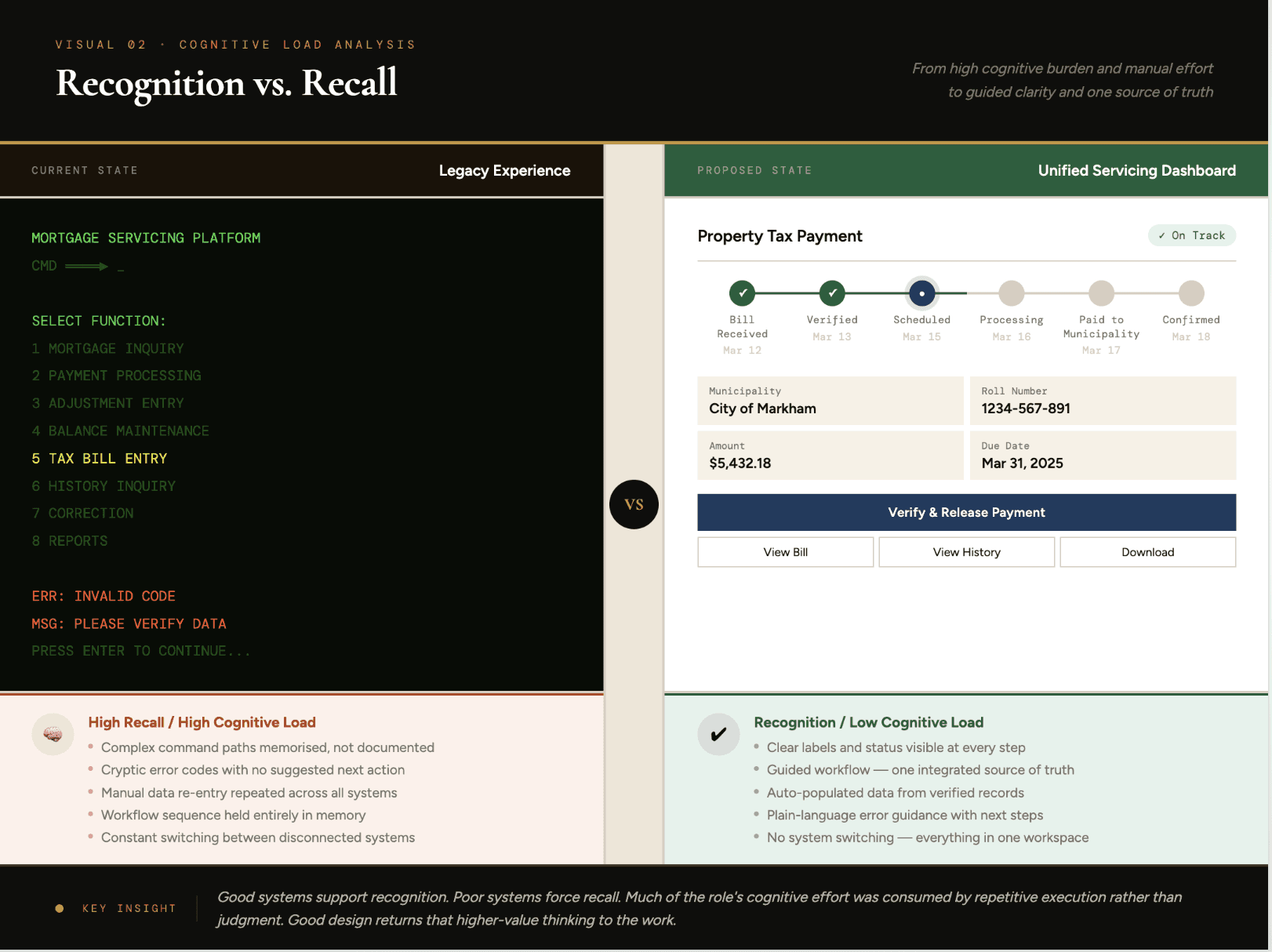
The cognitive load underneath it all
The system forced employees to hold everything in memory. Command paths. Workflow sequences. Reconciliation logic. Exception handling. Screenshot timing. All of it, simultaneously, under time pressure, every day.
Good design supports recognition, visible steps, guided actions, clear feedback. This system forced recall pure memory load, with no support layer.
The result: cognitive effort spent on remembering, not on the judgment and problem-solving the role actually required..
Service Blueprint
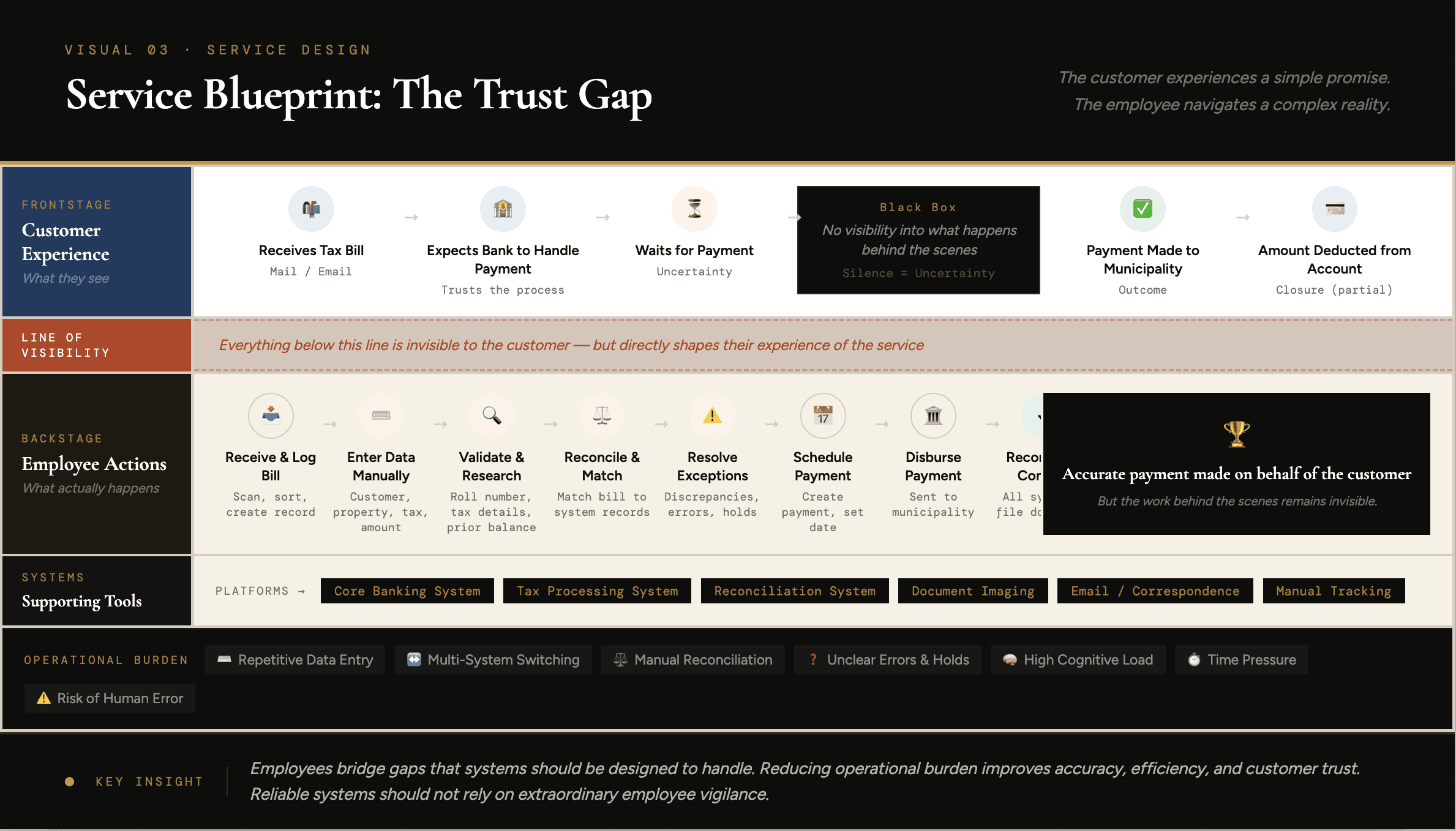
The service no one could see
What the customer experienced: Bill arrives → Bank handles it → Payment confirmed → Done.
What it actually took: Manual bill intake → Legacy system lookup → Entry ×70 per day → Cross-system update → Reconciliation → Exception handling → Error correction → Screenshot documentation → Final release
Between those two experiences: human vigilance. Personal habits. Institutional memory. No system holding it together — just people.
Design Opportunities
These are not tested solutions. They are design directions grounded in six months of observed operational pain.
01—Unified Servicing Dashboard One workspace replacing multi-system navigation. Customer record, servicing timeline, payment status, exception queue all visible without switching screens.
02 — Batch Processing & Smart Auto-Fill The system should remember what it already knows. Bulk upload, auto-population from verified records, anomaly detection, shortcut workflows.
03 — System-Level Audit Trail Every action logged automatically. Every entry traceable. No screenshots required. No reconstruction from memory. Pre-close confirmation. Post-close view-only record.
04 — Human-Centered Error Design Errors that tell you what happened and what to do next not just that something went wrong. Suggested fixes, guided escalation, plain language throughout.
05 — Customer Tax Visibility Layer ✓ Bill received ✓ Verification in progress ✓ Payment scheduled ✓ Payment sent ✓ Confirmation issued
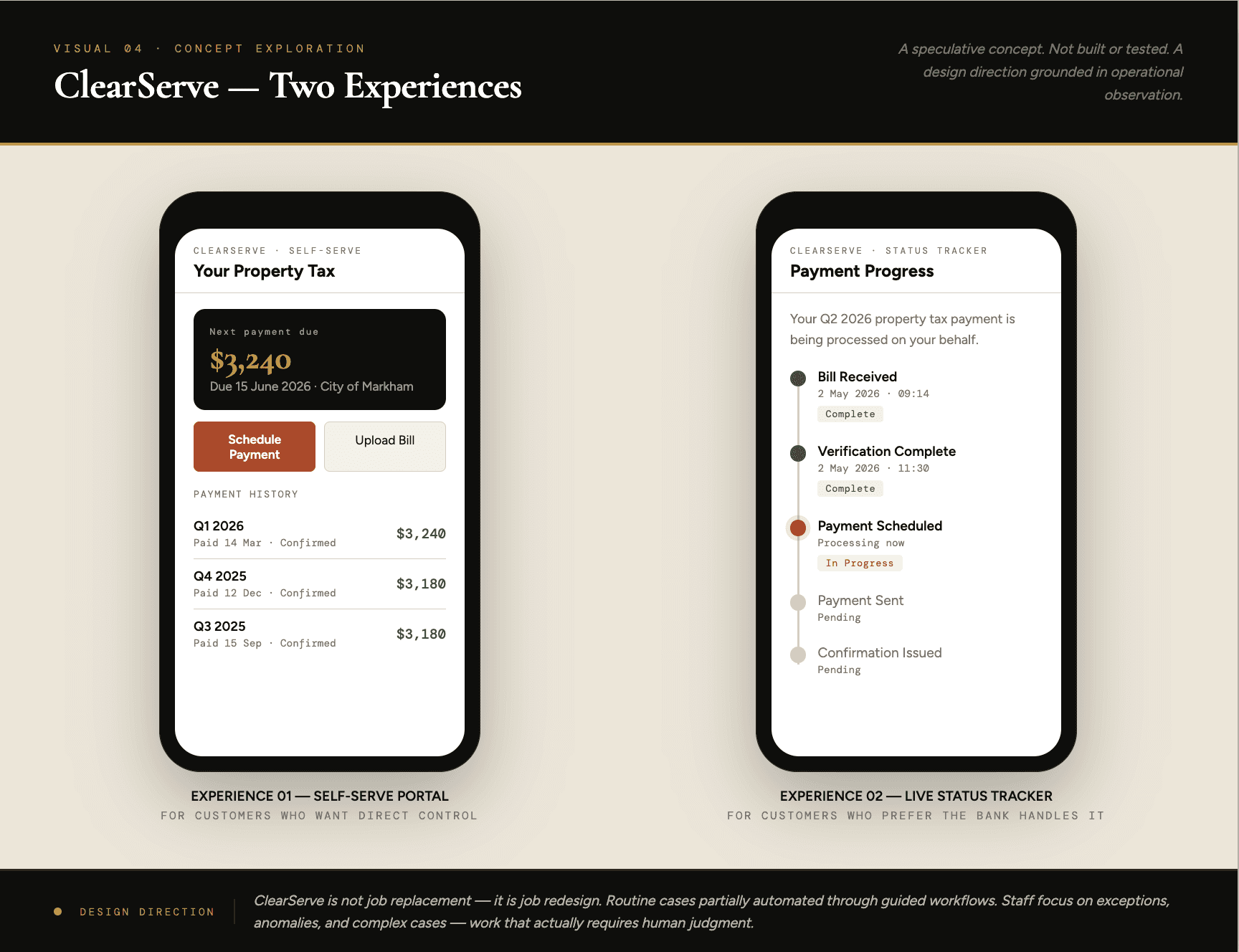
Concept Exploration — ClearServe
A speculative concept grounded in six months of operational observation. Designed as a concept exploration , not as a validated product recommendation, to translate operational insight into future-state service possibilities.
Layer 01 — Self-Serve Portal For customers who want control
A mobile-first portal where customers initiate or schedule property tax servicing digitally through a guided portal. Upload a bill, schedule a payment, see confirmation, track history. No phone calls. No waiting. No wondering.
Layer 02 — Live Status Tracker For customers who prefer the bank handles it
Not every customer wants to self-serve — and that is a valid choice. For them, ClearServe adds visibility without requiring action.
Bill received → Verified → Scheduled → Sent → Confirmed
Same service as today. Just no longer invisible.
Layer 03 — Operations Oversight Layer For the staff who make it work
Routine cases partially automated through guided workflows. Staff focus on exceptions, anomalies, complex cases, and quality oversight — work that actually requires human judgment.
This is not job replacement. It is job redesign. The mechanical work decreases. The work that requires people increases.
Speculative Impact — If ClearServe Worked
On staff time At approximately 70 entries per day averaging 3 minutes each, that is roughly 3.5 hours of repetitive data entry daily. A 50% reduction in manual input returns approximately 35 hours per month per officer to higher-value work.
On error recovery Errors requiring manual reconstruction took an estimated 20–40 minutes without an audit trail. A system log reduces that to minutes.
On customer trust A status tracker requires no behaviour change from customers — just visibility into a process that already exists. Low cost to build. Significant impact on trust.
On staff retention Jobs built entirely around repetitive entry burn people out. Redesigning around judgment and oversight makes the role more sustainable and more worth staying for.
All figures are estimates from six months of operational observation. Real impact depends on implementation and adoption.
Reflection
What surprised me most was not how outdated the systems were. It was how well my colleagues had learned to live with them.
Everyone had their own system. A screenshot routine. A personal checklist. An informal habit that compensated for what the technology failed to provide. From the outside, the operation looked smooth. From the inside, I could see that smoothness was held together by individual effort and knowledge that lived inside people, not inside systems.
That is a fragile kind of reliability. It works until someone leaves. Until someone gets sick. Until someone has a hard day and forgets to take a screenshot before closing.
This experience changed how I think about UX research. The most important operational problems are often invisible because teams adapt to friction until it becomes normalised. Eventually, friction stops being recognised as friction, it simply becomes "how work is done."
Finding those problems means being inside the work. Not studying it from a distance.
Trust is not built only through successful outcomes. It is built through clarity, resilience, and confidence in systems people cannot see.
Reliable systems should not rely on extraordinary employee vigilance. Good design makes reliability systematic — so people can focus on judgment, not compensation for broken systems.
UX Research Portfolio · Operational Ethnography · Service Design · Enterprise UX · FinTech
Note: This case study is based on anonymised operational observation. All proprietary system names, workflows, and identifiable institutional details have been generalised or modified to protect confidentiality while preserving research insight.